
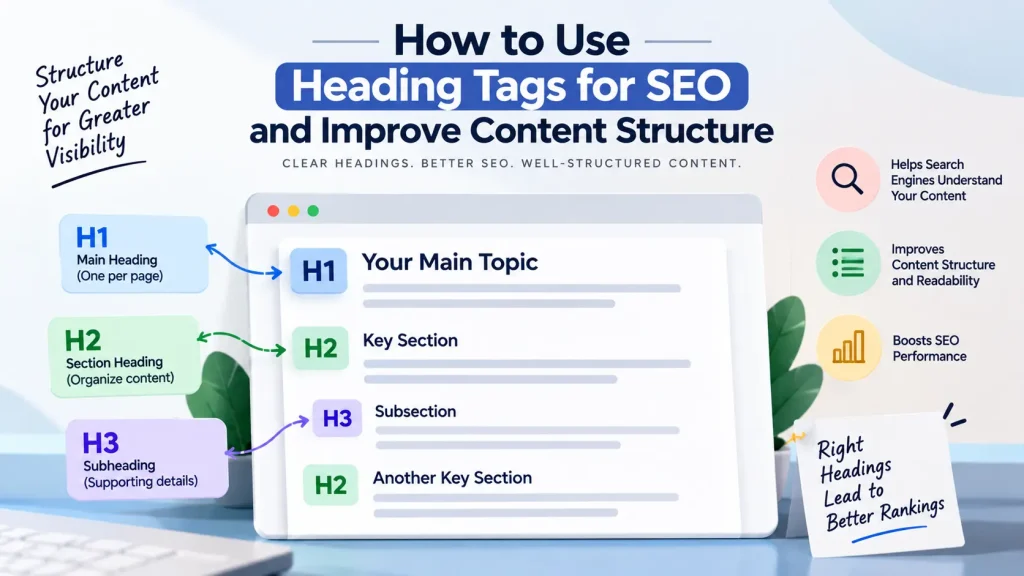
Heading tags help organize website content into a clear structure that is easier for both readers and search engines to understand. Knowing how to Use Heading Tags For SEO can improve content readability, clarify the relationship between topics, and support better on-page optimization.
From the H1 to H6 tags, each heading has a specific role. This article explains what are heading tags, how to structure them correctly, and how to use them effectively without over-optimizing your content.
In This Article
- What heading tags are and why they matter
- Understanding heading tag hierarchy
- How to use heading tags for SEO
- Common heading tag optimization mistakes
- Best practices for well-structured content
What Are Heading Tags and Why Do They Matter?
Heading tags are HTML elements used to organize content into headings and subheadings. They range from H1 to H6, with H1 generally representing the main topic and lower-level headings helping divide the content into smaller sections.
For readers, headings make long pages easier to scan. For search engines, a logical structure provides useful context about the main topics and supporting information on a page.
However, heading tags in SEO are not simply places to insert keywords. Their primary purpose is to create a meaningful and organized content structure.
Understanding Heading Tag Hierarchy
A proper heading tag hierarchy helps show how different sections relate to one another.
The H1 should clearly represent the main subject of the page. H2 headings should introduce major sections, while H3 headings can be used for supporting points within an H2 section.
For example:
- H1: Complete Guide to Website SEO
- H2: On-Page SEO
- H3: Keyword Optimization
- H3: Heading Tags
This structure makes the page easier to navigate and understand. Avoid choosing heading levels based only on font size or visual appearance. Headings should reflect the actual organization of your content.
How to Use Heading Tags for SEO Effectively
When learning how to use heading tags, start with the structure of your content rather than keywords.
First, create a clear H1 that accurately describes the page’s main topic. Then divide the content into logical H2 sections based on the questions or subjects your audience wants answered.
Use H3 headings only when a major section needs further explanation. Each heading should accurately describe the content below it.
Relevant keywords can be included naturally when they help explain the topic. For example, a heading such as “Best Practices for Heading Tag Optimization” is useful because it clearly tells readers what the section covers.
Common Heading Tag Optimization Mistakes
Poor heading tag optimization can make content confusing and difficult to scan. Common mistakes include:
- Using multiple headings without a clear structure
- Adding keywords unnaturally to every heading
- Skipping heading levels without a logical reason
- Using headings only for visual styling
- Creating vague headings that do not describe the section
A well-written heading should help readers quickly understand what information follows. Clear structure and relevance are more valuable than trying to force keywords into every section.
Best Practices for Well-Structured Content
Use headings to create a natural flow from the main topic to supporting details. Keep headings concise, descriptive, and relevant to the content beneath them.
A strong content structure can also improve the overall user experience by helping visitors find information more easily. When combined with quality content and effective Search Engine Optimization (SEO) practices, properly organized headings contribute to a clearer and more accessible website.
Frequently Asked Questions
Q1. What are heading tags?
Ans: Heading tags are HTML elements, from H1 to H6, used to organize webpage content into a structured hierarchy of headings and subheadings.
Q2. How many H1 tags should a page have?
Ans: In most cases, using one clear H1 for the primary topic helps maintain a simple and understandable page structure.
Q3. Do heading tags directly improve SEO rankings?
Ans: Heading tags help organize content and provide context about a page. They should be used primarily to improve structure and readability rather than as a shortcut to higher rankings.
Q4. Can keywords be used in heading tags?
Ans: Yes, relevant keywords can be used naturally when they accurately describe the section. Avoid forcing keywords into headings unnecessarily.
Conclusion
Knowing how to Use Heading Tags For SEO helps create content that is easier to read, navigate, and understand. Focus on a logical heading tag hierarchy, clear topic organization, and headings that accurately describe your content.
Build Better Content Structure With Professional SEO Support
A well-structured website requires more than properly placed headings. TVM Info Solutions provides professional SEO and digital marketing service to help businesses improve on-page content, website structure, and search visibility through relevant optimization strategies.
📞 Call Us: +919004590039
📧 Email: contact@tvminfo.com
Our Business Automation Solutions:
💬 ChatKar – Turn WhatsApp chats into sales
🌟 StarCreator – Build AI automations
📧 AutoMailSend – Own your email marketing
🎯 AttractLead – Capture & convert leads automatically

Pingback: Keyword Stuffing: How to Avoid It for Better SEO